Every day, countless PDF Editors, Image Tools, File Converters, and other online services pop up on the internet. But before using any of these, it's worth asking a fair question: is this website actually safe and trustworthy?
If a website claims to be 100% Free, No Uploads, No Sign-Up Required, and Browser-Based, it's natural for a few thoughts to cross your mind:
- "If everything is free, what's the catch?"
- "Is my data actually safe?"
- "Can I trust this website with my files?"
These are fair questions, and you shouldn't blindly trust any website on the internet without checking a few basic things first. Here's exactly what to look for before trusting any PDF tool online — and the real story of why QuickPDFOnline works the way it does.
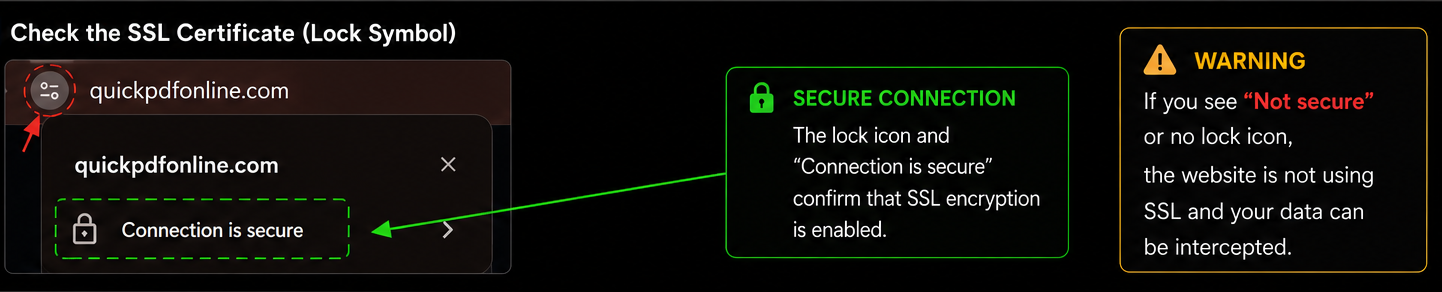
1. 🔒 Check the SSL Certificate (Lock Symbol)
The first thing to look at is the lock symbol next to the website address in your browser. If you see a lock icon near the URL, it means the website is using SSL encryption. This helps keep the data exchanged between you and the website secure — so anything you type or upload is protected in transit.
No lock symbol, or a warning that the connection isn't secure? That's a sign to be cautious before entering any information or using the tool.
2. The URL Should Always Start with HTTPS
A website's address should always begin with https:// — not just http://. If a website is running only on plain HTTP, you should be cautious.
In today's world, HTTPS is a basic necessity for any genuine, secure website. It's such a baseline requirement now that most modern browsers will actively warn you when a site doesn't have it.

3. Look for a Privacy Policy and Contact Information
A genuine website never hides its Privacy Policy or Contact Information. These pages tell you:
- How the website handles your data
- How your information is used
- How you can reach them if you need to
If a website has no privacy policy, no terms of service, and no way to contact anyone — that absence itself is worth noticing.
4. Understand How a Website Actually Makes Its Claims True
Finally, look at what the website is claiming — and then understand how it actually delivers on that claim technically. It's not enough for a site to say "100% free, no uploads." What matters is understanding how that's actually possible.
That's where my own story comes in.
My Experience With Online PDF Tools
Whenever I needed to edit a PDF, I faced the same problem that millions of people still face today. I would search for a PDF editor, upload my file, make a few changes, and then suddenly hit a paywall.
Every time I uploaded an important PDF, I had the same question in my mind: "Where is my file going?" Was it being stored somewhere? Would it be deleted after processing? Could someone access it later? Most websites never gave me a clear answer.
That experience is what made me curious about how online PDF tools actually work — and whether there was a better way to build one.
How Browser-Based PDF Tools Actually Work
While researching this, I discovered something interesting: modern web browsers have become incredibly powerful. Many PDF operations can now happen directly inside your browser without sending files to a remote server at all.
Tasks such as:
- Merge PDF
- Split PDF
- Rotate PDF
- Add Watermark
- Extract Pages
- Count PDF Words
can often be performed entirely locally, on your own device. In simple words: your browser does the work. That idea eventually became the foundation of QuickPDFOnline.
So Why Is QuickPDFOnline Free?
This is one of the most common questions we receive. Many people assume: "If it's free, there must be a hidden catch."
But browser-based tools are genuinely different. Traditional PDF websites often rely on expensive file-processing servers — every file you upload has to be received, processed, and sent back by their infrastructure, and that costs money at scale.
Browser-based tools use your device's processing power instead. Because of this, operating costs can be significantly lower. That's what makes it possible to offer many tools completely free, without needing to fund a server farm to process millions of files.
What does "No Uploads" actually mean?
When a tool is browser-based:
- Your file stays on your device
- Processing happens inside your browser
- In many cases, files never need to be sent to a remote server at all
- You maintain greater control over your own documents
Think of it like a calculator. When you calculate 2 + 2, the numbers are processed right there on your device — nothing gets sent anywhere to compute that. Browser-based PDF tools work in a very similar way.
How You Can Verify This Yourself
You don't need to take our word for it. You can verify this claim yourself, right now, in under a minute.
If the tool works entirely in your browser, you should not see large file-upload requests being sent to a remote server. Technical users often use exactly this method to understand how a website really handles their files — and we genuinely encourage you to try it.
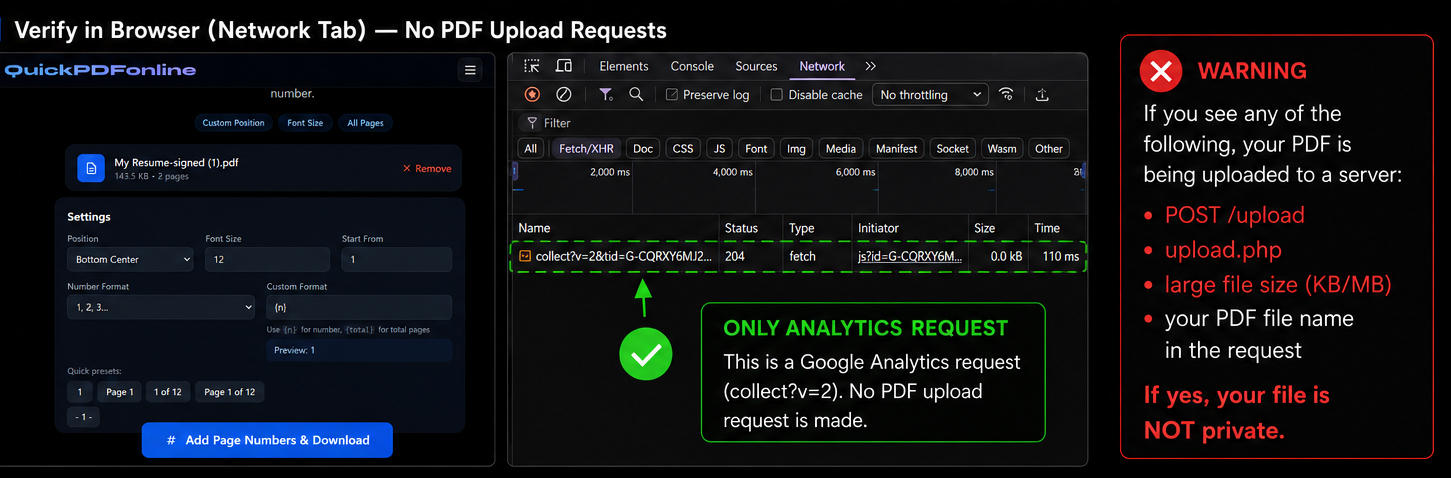
collect?v=2, which is a Google Analytics event used for anonymous website statistics.
Your PDF file is never included in this request.
If the tool works entirely in your browser, you should not see any large file-upload requests (such as a POST request containing your PDF) being sent to a remote server.
Our Privacy Promise
At QuickPDFOnline, we believe privacy should be simple. That's why our goal is built around a few clear commitments:
Frequently Asked Questions
Conclusion
Just because a website claims to be 100% Free, No Uploads, or Browser-Based does not automatically make it a scam — and it doesn't automatically make it trustworthy either. What actually matters is transparency. Before trusting any website, check for HTTPS, the SSL lock symbol, a real privacy policy, contact information, and a clear explanation of how the service actually works. QuickPDFOnline was built because I personally experienced the frustrations of traditional PDF websites — forced uploads, unnecessary sign-ups, watermarks, and unexpected paywalls. Our goal is simple: make PDF tools fast, accessible, privacy-friendly, and genuinely useful for everyone. If a website is transparent about its technology, respects your privacy, and gives you control over your own files, that's a far stronger sign of trust than any marketing claim could ever be.
See It for Yourself
Open any tool, open your browser's Network tab, and watch what actually happens.
Try QuickPDFOnline →